Purchase Order
The Purchase Order module allows suppliers to view, manage, and track all purchase orders raised against them through the Supplier Portal.
It provides a complete overview of order statuses, item details, taxes, addresses, payment terms, and linked documents — all in one place.
Purchase Order Overview
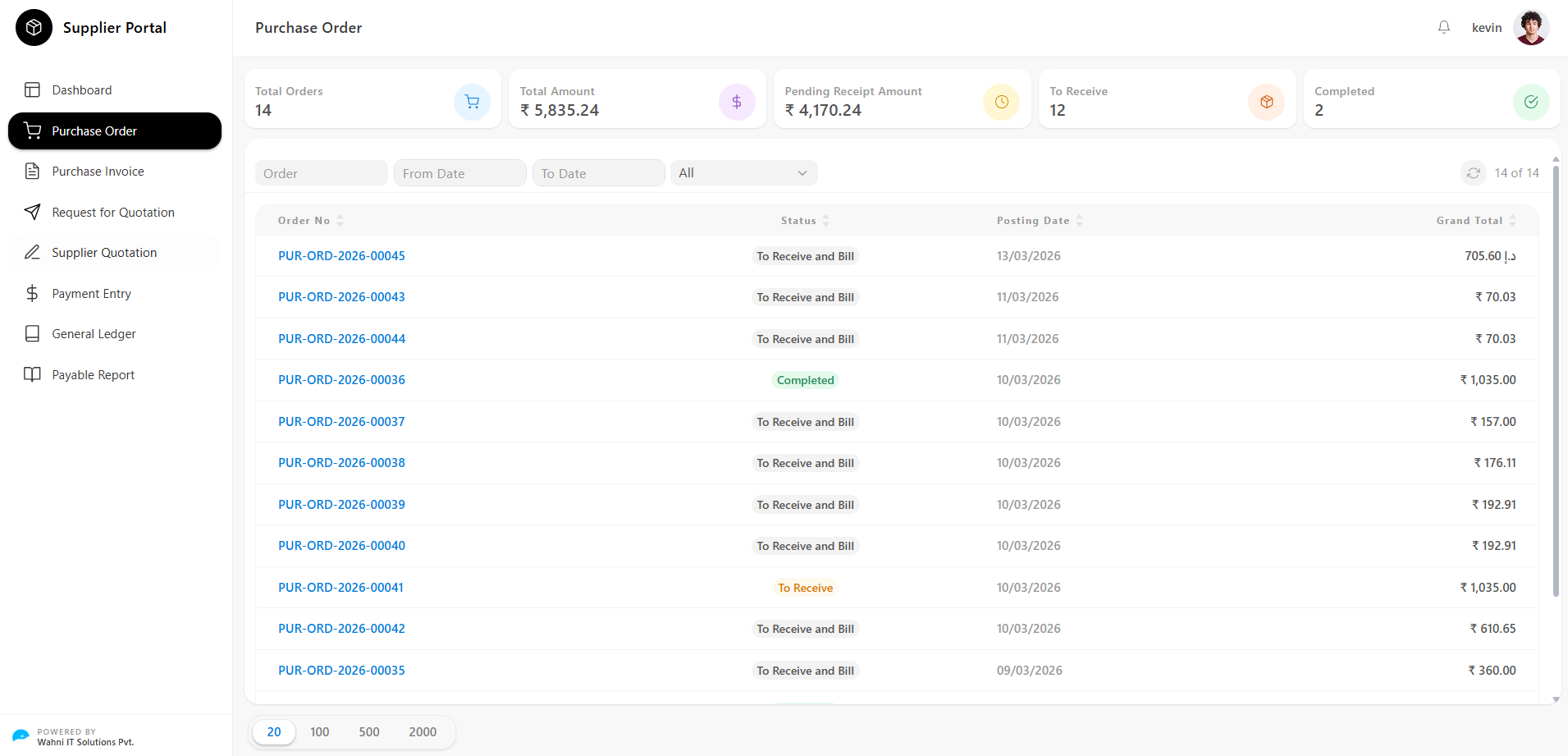
The Purchase Order page gives suppliers a real-time summary of all orders along with tools to search and filter them efficiently.
Key Metrics
At the top of the page, summary cards display important order data:
- Total Orders Shows the total number of purchase orders issued to the supplier
- Total Amount Displays the combined grand total value of all purchase orders
- Pending Receipt Amount Indicates the total value of orders that are yet to be received
- To Receive Shows the count of orders currently awaiting receipt
- Completed Displays the number of orders that have been fully received and billed
Filtering and Searching Orders
Suppliers can narrow down the order list using the following filters:
- Order → Search by specific Purchase Order number
- From Date → Filter orders from a selected start date
- To Date → Filter orders up to a selected end date
- Status Filter → Filter orders by status:
- All
- To Receive and Bill
- To Receive
- Completed
Order List
The purchase orders are displayed in a table format with the following columns:
- Status
Current state of the order:
- To Receive and Bill
- To Receive
- Completed
- Posting Date Date when the order was created
- Grand Total Total value including taxes and charges
Pagination
Suppliers can control the number of visible records:
- 20 / 100 / 500 / 2000 records per page
Order Details
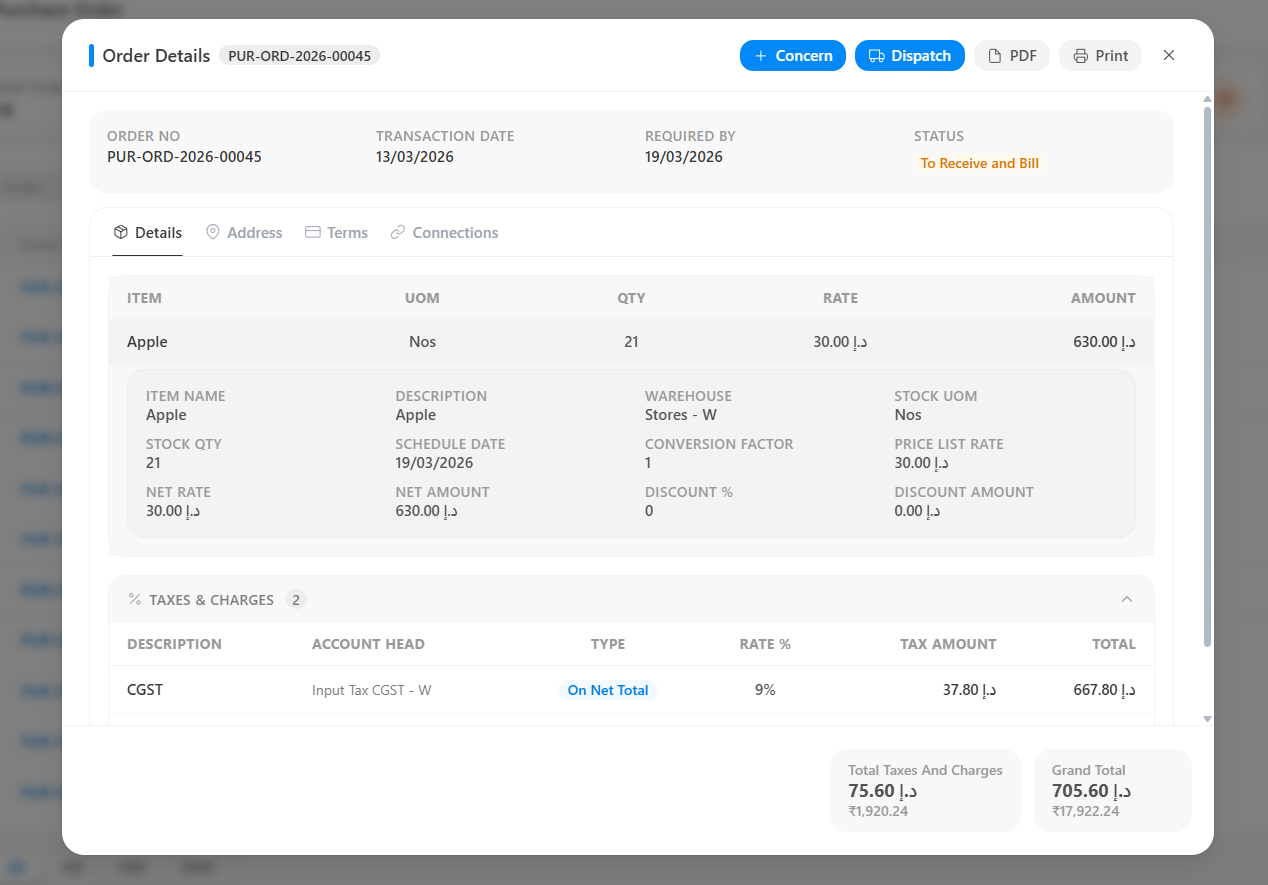
Clicking on any Order No opens the Order Details modal.
This modal provides a complete breakdown of the purchase order across four tabs:
- Details
- Address
- Terms
- Connections
Order Header
Displays summary-level information:
- Order No → Unique reference number
- Transaction Date → Order creation date
- Required By → Expected delivery date
- Status → Current order status
Details Tab
The default tab showing item and tax details.
Item Details
Each item includes:
- Item Name
- UOM (Unit of Measurement)
- Quantity
- Rate
- Amount
Expanded Item Information
- Item Name
- Description
- Warehouse
- Stock UOM
- Stock Quantity
- Schedule Date
- Conversion Factor
- Price List Rate
- Net Rate
- Net Amount
- Discount %
- Discount Amount
Taxes & Charges
Displays tax components:
- Description (CGST, SGST, IGST, etc.)
- Account Head
- Type (On Net Total / Previous Row)
- Rate %
- Tax Amount
- Total
Summary Values
- Total Taxes and Charges
- Grand Total
Address Tab
Displays all addresses related to the order:
- Supplier Address
- Company Billing Address
- Shipping Address
- Dispatch Address
All fields are read-only.
Terms Tab
Contains payment and delivery conditions:
- Payment Terms
- Payment Terms Template
- Payment Schedule
- Terms and Conditions
- Notes / Instructions
Connections Tab
Displays linked documents:
- Supplier Quotation
- Purchase Invoice
Purpose
- Verify quotations
- Track invoices
- Maintain audit trail
Action Buttons
Located at the top-right of the modal:
- Concern
- Dispatch
Concern
Used to raise issues related to the order.
How to Raise a Concern
- Click Concern
- Fill subject and description
- Submit
Concern Details Page
- Concern ID
- Subject
- Description
- Status (Open / In Progress / Resolved)
- Raised By
- Date
- Response
Purpose
- Report issues
- Maintain communication
- Track resolutions
Dispatch
Used to record shipment details.
How to Dispatch
- Click Dispatch
- Fill shipment details
- Submit
Dispatch Details
- Dispatch Date
- Courier / Transporter
- Tracking Number
- Vehicle Number
- Dispatch Quantity
- Remarks
Dispatch Details Page
- Dispatch ID
- Order Reference
- Dispatch Date
- Transport Details
- Items Dispatched
- Status (Dispatched / In Transit / Delivered)
Purpose
- Record shipments
- Track delivery
- Maintain logistics history
PDF and Print
- PDF → Download order document
- Print → Print directly