Purchase Invoice Admin
The Purchase Invoice (PI) module allows the admin to record the bill received from a supplier for purchased goods or services. It is created based on a Purchase Order or entered manually and confirms the payable amount including taxes and charges.
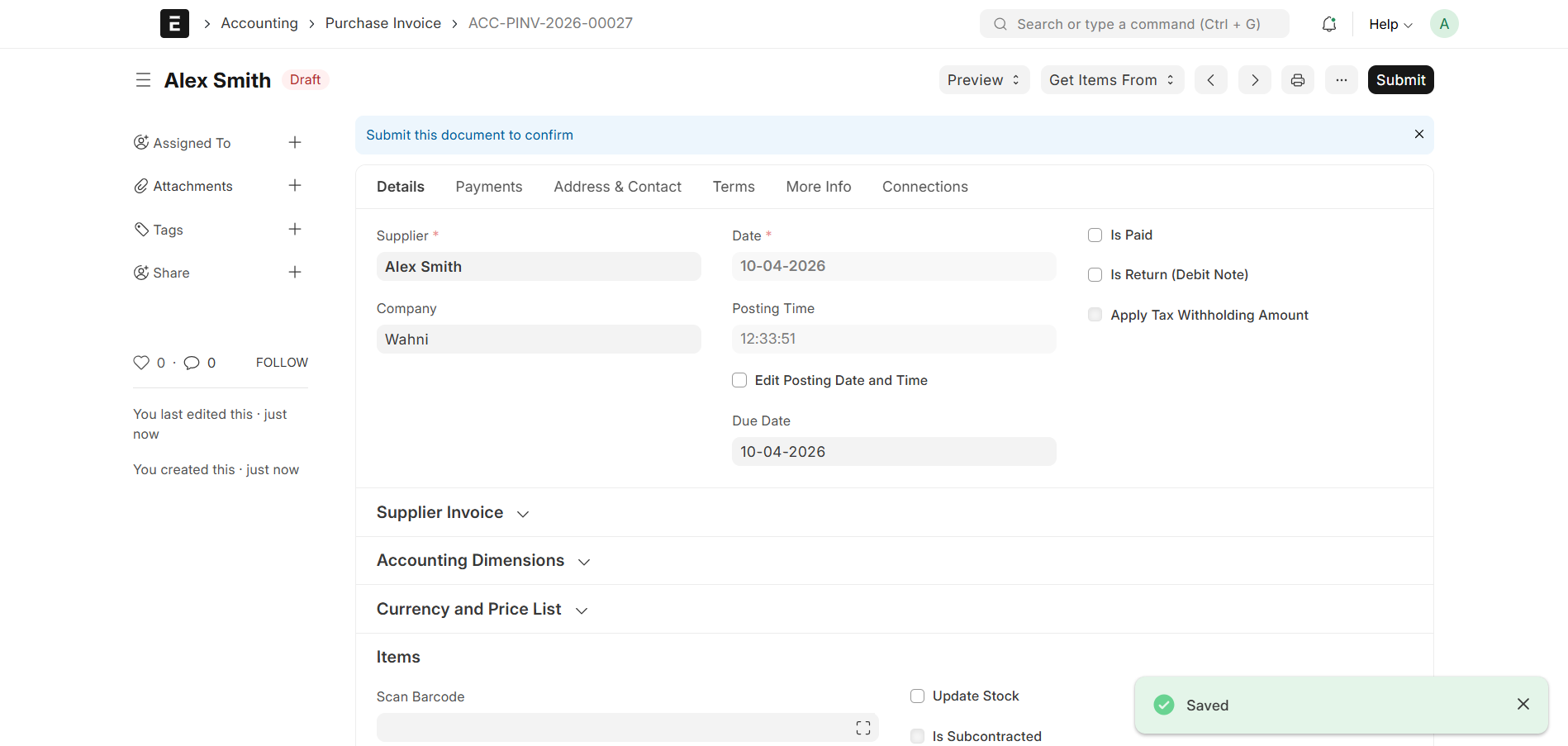
Purchase Invoice Creation
- Purchase Invoices can be created:
- From a Purchase Order
- Manually by the Admin
- To create from Purchase Order:
- Open Purchase Order
- Click Create → Purchase Invoice
Draft Stage
- Once saved, the Purchase Invoice will be in Draft status
Submit Action
- After verification, click the Submit button
After Submission
- The Purchase Invoice status changes to Submitted
- The document becomes read-only
- Accounting entries are automatically created
- The payable amount is recorded
Basic Details
Each Purchase Invoice contains the following key details:
- Invoice ID → Unique identifier
- Supplier → Selected supplier (e.g., Alex Smith)
- Posting Date → Invoice creation date
- Posting Time → Time of entry
- Due Date → Payment due date
- Company → Organization receiving the invoice
Items Section
The Items table includes:
- Item → Name of the product
- Accepted Quantity → Quantity received
- Rate → Price per unit
- Amount → Total price per item
Taxes and Charges
The Purchase Invoice supports tax configuration:
- Tax Category → Applicable tax group
- Taxes and Charges Template → Predefined tax template
- Shipping Rule → Delivery charges (if applicable)
- Incoterm → Shipping terms
Tax Breakdown
Each tax row includes:
- Type → Calculation method (e.g., On Net Total)
- Account Head → Tax account
- Tax Rate → Percentage
- Amount → Calculated tax value
Summary
- Total Taxes and Charges → Total tax amount
- Grand Total → Final payable amount
Address & Contact
The Address section includes:
- Supplier Address → Supplier’s registered address
- Company Billing Address → Billing details of the company
- Shipping Address → Shipping details of the company
This ensures proper communication and billing handling.
Totals Section
- Total Quantity → Total items quantity
- Total → Total before tax
- Net Total → Total after adjustments
- Grand Total → Final invoice value
- Rounded Total → Rounded amount (if enabled)
- Outstanding Amount → Amount yet to be paid
Purchase Invoice Status Flow
- Draft → Invoice saved but not submitted
- Submitted → Invoice confirmed and posted
- Paid → Fully paid
- Unpaid → Payment pending
- Overdue → Payment past due date
- Cancelled → Invoice cancelled
Purpose
- Record supplier bills
- Track payable amounts
- Generate accounting entries
- Manage payments and outstanding balances
Summary
The Purchase Invoice module helps Admin:
- Convert Purchase Orders into invoices
- Track supplier payments
- Maintain financial accuracy
- Manage the purchase billing lifecycle