General Ledger
The General Ledger module allows suppliers to view a complete chronological record of all accounting transactions posted against their account through the Supplier Portal.
It provides a detailed ledger view of debits, credits, running balances, and linked voucher documents — all in one place.
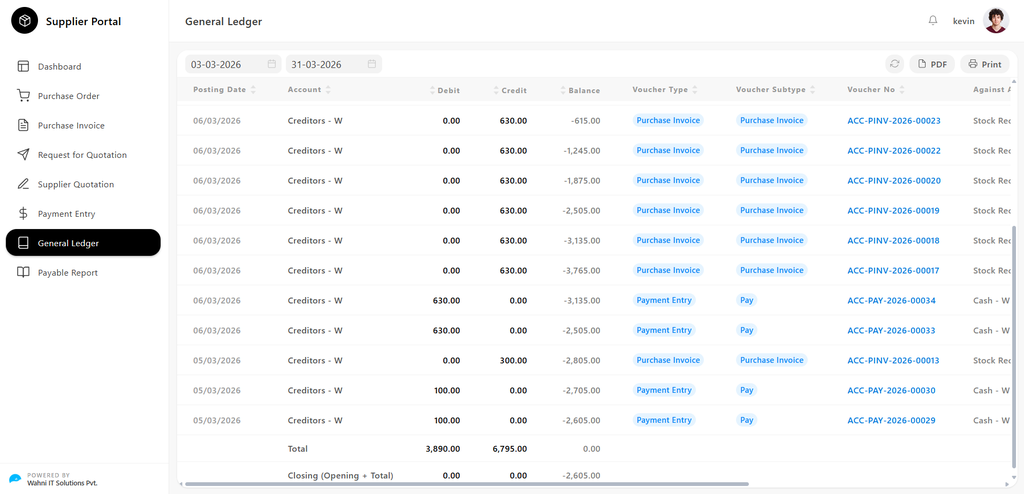
General Ledger Overview
The General Ledger page gives suppliers a date-filtered view of all accounting entries with full voucher traceability and downloadable reports.
Date Range Filter
Suppliers can control the period of ledger entries using the following filters:
- From Date → Select the start date of the ledger period
- To Date → Select the end date of the ledger period
The ledger updates automatically based on the selected date range.
Action Buttons
Located at the top-right of the page:
- PDF → Download the ledger as a PDF
- Print → Print the ledger directly
Ledger Table
All entries are displayed in a table format with the following columns:
- Posting Date Date when the entry was recorded
- Account Ledger account involved (e.g., Creditors)
- Debit Amount reducing payable balance
- Credit Amount increasing payable balance
- Balance Running balance after each entry
- Voucher Type
Type of document:
- Purchase Invoice
- Payment Entry
- Voucher Subtype
Further classification:
- Purchase Invoice
- Pay
- Voucher No Unique reference number → Click to view full document details
- Against Account Counter account involved
- Against Voucher Type Type of counter document
- Against Voucher Reference number of counter document → Click to view linked document
Understanding Ledger Entries
Purchase Invoice Entries
When a purchase invoice is recorded:
- Debit → 0.00
- Credit → Invoice amount
- Balance → Increases (amount payable increases)
- Voucher Type → Purchase Invoice
- Against Account → Stock Received But Not Billed
Payment Entry Records
When a payment is made:
- Debit → Payment amount
- Credit → 0.00
- Balance → Decreases (liability reduces)
- Voucher Type → Payment Entry
- Against Account → Cash / Bank
Ledger Totals
Displayed at the bottom of the table:
Total Row
- Total Debit → Sum of all debit entries
- Total Credit → Sum of all credit entries
- Balance → Net movement during the period
Closing Balance
- Calculated as: Opening Balance + Net Movement
- Represents the final account balance for the selected period
A negative balance indicates the amount payable to the supplier.
Voucher Navigation
The ledger provides direct access to related documents:
- Click Voucher No → Opens the source document
- Click Against Voucher → Opens the linked counter document
This ensures full traceability of every transaction.